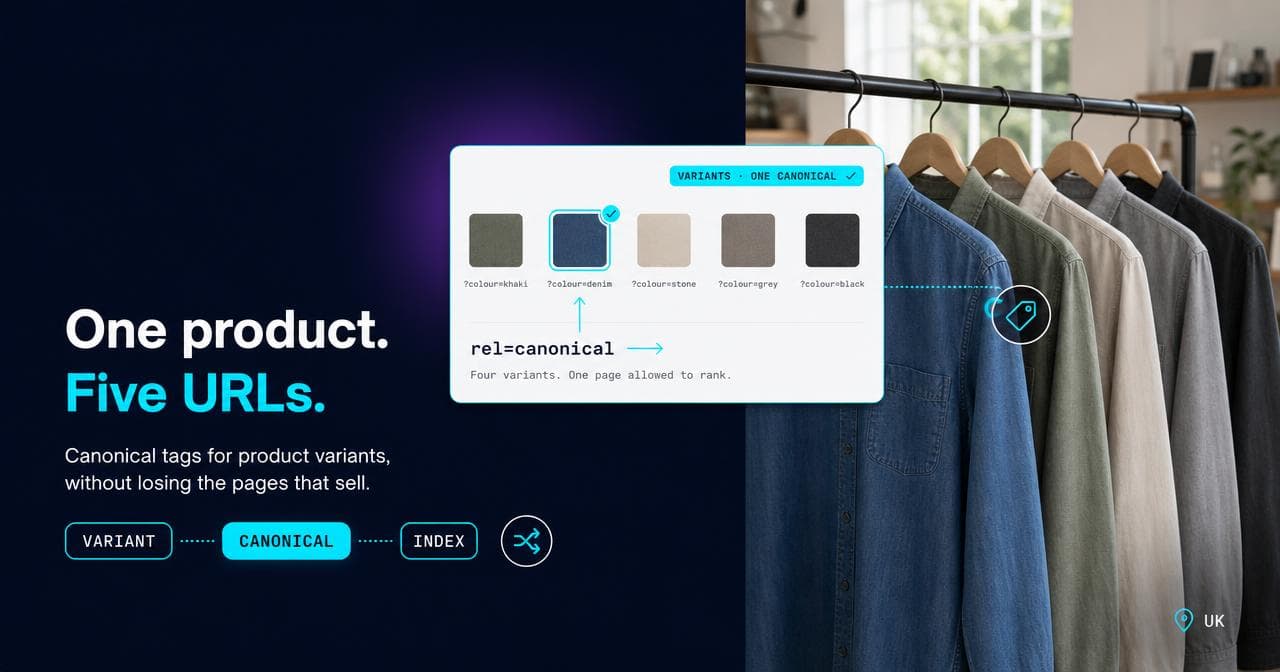
A colour and a size selector on one product page look like a UI detail until you check Search Console and find dozens of near-identical URLs for what is, to a shopper, one product. Somebody has to decide which of those URLs is the one Google should treat as real, and "canonicalise them all to the parent" is the answer that feels safest, and is wrong often enough to be worth stopping on.
A canonical tag (the rel="canonical" link in a page's HTML that tells Google which URL, among a set of duplicates or near-duplicates, should carry the ranking signal) doesn't have one correct setting for product variants. The right answer depends on whether people actually search for that specific colour, size or configuration, not on a rule that applies the same way to every catalogue. This article covers what a canonical tag genuinely does and doesn't do, why variants create the URL-per-SKU problem in the first place, the decision that tells you whether a variant earns its own indexable page, why colour usually clears that bar and size rarely does, how Shopify, Magento and WooCommerce default this differently, where every indexable page needs a self-referencing canonical and where people forget it, where this collides with a Google Shopping feed, and the two opposite failure modes that both show up looking like the same problem.
If you run or audit a store where one product spins off a URL per variant and you need to decide what to canonicalise where, this is a decision framework, not a syntax tutorial: you already know how to write a canonical tag, the actual question is where to point it.
What a canonical tag actually does, and what it doesn't
Google's own documentation is explicit that a canonical tag is a hint, not a directive. It doesn't stop a URL being crawled, doesn't noindex it, and doesn't redirect anyone away from it. The variant page still exists, still returns a 200, and Google can still fetch it. What changes is which of the duplicate set Google treats as the one worth ranking, and where the reviews, links and relevance that would otherwise be split across near-identical pages get pooled instead.
That distinction matters because canonical tags get reached for as a fix for problems they don't actually solve. If a catalogue is generating tens of thousands of colour and size combinations and the real issue is crawl budget, a canonical tag alone doesn't stop Googlebot fetching every one of those URLs before it can discard them. That's a robots.txt, parameter-handling or URL-generation problem, not a canonicalisation one. Canonical tags consolidate ranking signal after the crawl; they don't prevent the crawl from happening in the first place.
Why one product becomes ten URLs
Colour, size, pack size, material: each attribute a store lets a shopper choose usually becomes either a URL segment or a query parameter, depending on the platform, and a product with three colours and four sizes can spin off up to twelve URLs for what is semantically one item. None of that is a mistake. It's what a variant selector does by default the moment more than one attribute exists.
Google gives you a separate mechanism for describing that relationship, and it's easy to conflate with canonicalisation because both deal with the same set of URLs. ProductGroup structured data, with hasVariant nesting the individual variants (or isVariantOf pointing back the other way), tells Google how the variant set relates to each other, independent of which URL you've chosen to canonicalise to. The canonical tag decides which URL ranks. The structured data describes the group regardless of that choice. Setting one and skipping the other is a common half-finished implementation I still see on catalogue audits.
The decision: does anyone search for this exact variant
The test that actually matters is simple to state and requires real keyword data to answer honestly: does a meaningful number of people search for this specific variant on its own, not the base product. If they do, that variant earns its own indexable page, with its own title, its own content difference (not just a swapped product photo), and its own self-referencing canonical. If they don't, canonicalise it to the parent and let the parent do the ranking. I pull that answer from Search Console query data or a proper keyword tool, never from a guess about what sounds popular: the two disagree often enough on colour and size searches that guessing gets it wrong in both directions, indexing variants nobody searches for and giving away rankings on ones that would have earned their own page.
This is a judgement call made per attribute, not per product, and it's the point where most canonical decisions on variants go wrong: applying one rule to every attribute a catalogue happens to have, rather than checking whether that specific attribute carries its own demand.
Colour usually clears the bar. Size almost never does
In the catalogue audits I run, colour is by far the attribute most likely to carry genuine, independent search demand, and roughly one in three to one in four colour variants clears that bar on a typical apparel catalogue; size clears it on fewer than one in twenty. Someone searching for a specific colour of a specific product type is describing real intent, and a store that canonicalises every colour variant back to a generic parent page is routinely giving away rankings it could otherwise hold.
Size behaves differently, and the reason is where it sits in the decision. Colour is often part of how someone discovers or narrows down what they want. Size is usually a checkout-stage decision made after the product's already been chosen, which is why "size 9" rarely shows up as its own search intent the way a colour does. The exception worth naming: when the dimension in question is the product line itself rather than a variant of something bigger, a mattress size or a bed frame width, it behaves like colour, not like a shoe size, because it's genuinely how people search for that category.
How Shopify, Magento and WooCommerce default this differently
This isn't a setting you can assume is right just because it's the platform default; each one starts from a different place. On Shopify, variant selection sits behind a query parameter on the same product URL, and the canonical stays on the clean URL without that parameter by default. Unless you've deliberately built separate, crawlable pages per variant, there's usually nothing to decide.
Magento is the platform where this needs checking directly rather than assuming. A configurable product's underlying simple products can each get their own crawlable URL, and whether that happens depends on a visibility setting on the simple product, not on anything inherent to how configurable products work. On 18 Carati, the Magento 2.4 fine-jewellery catalogue I run SEO for, the rings alone vary by metal and size, which is exactly the kind of configurable product where that setting is worth confirming rather than assumed. It is the kind of setting that stays on for months without anyone on the team noticing, quietly indexing every underlying simple product as its own thin, near-duplicate page.
WooCommerce keeps variations behind a selector on one product URL by default, using the variation mechanism WordPress and WooCommerce ship natively. The near-duplicate risk on WooCommerce shows up specifically when a store skips that mechanism and lists each colour as its own separate product instead, usually so it displays individually in a category grid, which recreates the exact problem canonicalisation is meant to prevent.
The self-referencing canonical, and where people forget it
Any URL meant to rank independently, whether that's the parent product page or a variant that's genuinely earned its own page, needs a canonical tag pointing at itself. This is the quiet default every indexable page should have, and it goes wrong in two specific, recurring ways.
The first is a template default that never got updated: a store deliberately builds a standalone page for a high-demand colour variant, then the canonical tag still points at the parent because that's what the template does for every variant, earned page or not. The work of building the page gets done and then quietly wasted, because the canonical tells Google not to index it separately. The second is the parent page itself losing its self-reference after a URL restructure, a redirect chain, or a migration, and nobody checking that it still points at itself rather than somewhere stale. It's a two-minute check, and on a new catalogue it's usually the first thing I look at: view source on any URL you want to rank, and confirm the canonical target is that same URL.
Where this collides with your Shopping feed
Google Merchant Center has its own requirement running alongside all of this, and it's worth knowing before a canonical cleanup runs into it by accident. Merchant Center needs each product variant to have its own distinct landing page URL, with variants sharing a common item_group_id so Google can group them for display. That requirement is about the URL existing, resolving correctly, showing accurate price and availability, and staying live, not about which URL your organic canonical points to.
Canonicalising a variant's organic ranking back to the parent doesn't break that. The URL keeps working exactly as before: it resolves, it's crawlable, and it shows the right product to anyone who lands on it. What does break it is treating "canonicalise" and "remove" as the same instruction: a well-meaning tidy-up noindexes or redirects the variant URLs it's just decided shouldn't rank on their own. I've seen a Shopping feed lose a meaningful slice of its variant listings within a week of exactly that kind of cleanup, with nobody connecting the drop back to the SEO change until someone went looking at the feed diagnostics.
Both failure modes are common, and they look the same from the outside
The brief version of everything above: canonicalising away a variant that carries real search demand, and indexing every variant when none of them do, are opposite mistakes, and both are common on real catalogues. From a distance they present identically, as "we're not ranking well for this product line", which is why I never start with a fix when a client brings me that brief. The first question is which of the two is actually happening, because the two fixes point in opposite directions and applying the wrong one makes the real problem worse. Search Console's Alternate page with proper canonical tag status is the fastest way to see, per URL, which side of that decision your platform actually landed on.
If you're not sure which of your own variant URLs deserve their own page and which are quietly splitting your rankings, that's the audit our SEO team runs on a catalogue before touching a single canonical tag.
Sources.
- Consolidate duplicate URLs — Google Search Central (accessed August 2026)
- Include variants in your product data — Google Search Central (accessed August 2026)
- Item group ID [item_group_id] — Google Merchant Center Help (accessed August 2026)